
Barcode X is the complete barcode solution. Use the standalone version on Mac OSX or PC Windows to make barcode graphics as vector EPS and other formats or to print labels. Or use the plug in for Filemaker and 4D or as an ActiveX (Com) control.
Make vector based accurate barcodes for including in artwork in Illustrator,Quark XPress, InDesign, Corel Draw and other applications, or use our plugins to make barcodes directly in your FileMaker, 4d, Access, or SQL database.
Barcode X Image Creation Software - Windows PC
$550
Barcode X Image Creation Software - Apple MacIntosh
$550
Overview
Specifications
Downloads
Images
The Most Comprehensive Barcode Application Available
Peninsula Barcode has more code types, more options and more control than any other Barcode application in existence. Despite this it is still simple to use producing the most accurate barcodes at the click of a button.
Award Winning
Barcode X technology is used in many products, it is award winning MacUser gave it 4.5 Mice, allowing versatile barcodes to be built reliably and quickly. We have been developing the technology for over 18 years, to make it easier for you to make the codes you need.
Produces many output formats
Illustrator Eps file are made as standard. Barcode can also output picts, tiffs, metafiles, BMP's and even Text for use in mail merges. Thanks to our unique technology.
We don't make formats that make barcodes that don't scan such as JPEG.
Compatible with all applications
Due to the large number of output formats supported, all applications are supported. However if you intend to make barcodes for use in a database we recommend some of our other products based on the same technology. See our PlugIns page for details.
Makes Single Barcodes As Graphics
Making a barcode in Barcode is easy, Open The Application, choose the code type from the menu, enter the code number in the main code box. Click OK and your barcode appears on screen. Click on the barcode to save it ready for import into another application.
Outputs Text As Graphic Outlines
When using the correct font under a barcode, Barcode outputs the text as graphic outlines, ensuring that no font issues are encountered. Barcode is the only Barcode application that does this.
Import From CSV and TAB Files
Barcode imports numbers from CSV and Tab files to quickly make barcode graphics from a list you already have.
Serial Numbered Barcodes At A Click
Barcode can make serial numbered barcodes quickly, simply enter a start and end number, click OK and the barcodes are made as separate graphics files..
Fully Scriptable On Mac and PC
Barcode is scriptable via Applescript and AppleEvents on the Apple Macintosh or DDE on Windows. This allows you to set up a full workflow system with little user intervention.
Fully Integrated Labelling Software
Barcode can also make labels, we don't expect you to pay extra for this. The labelling mode allows you to make the labels of your choice quickly and easily. Simply set up the label on screen and click Print. You can make serial numbers, import from files and include pictures, text and graphics on your labels.
Fast Track Start
Be up and running in under 5 minutes. Easy to use installer installs all the bits you need and provides you with a shortcut to get at the application.
Code identification service by e-mail, just e-mail us the code and we'll identify it, or use one of our readers to do it automatically.
Adheres to all industry standards.
Code set-up options
Bar width reduction and increased facility, allowing you to adjust the width of the bars which compensates for ink spread on printing presses and other output devices.
Height adjustment this even works with text thanks to our unique technology.
Scale adjustment to allow you to fit the codes to where you want to use them.
Many options to numerous to mention accessible through our easy to use tabbed interface.
Easy to use Tabbed interface
Only see the really important stuff, but tab easily and quickly to the more detailed options.
The tabs feature sections for Lines, Fills, Colours, Text, Sizes and more specialised barcode related options.
Whether you use the options or not is up to you Barcode makes barcodes either way.
Full Technical Support
Barcode is supported by specialist barcode technicians, with experience in Design, Repro and Specialist Technical Support. Simply e-mail us a query and we will solve your problem.
Easy To Use One Click Generation
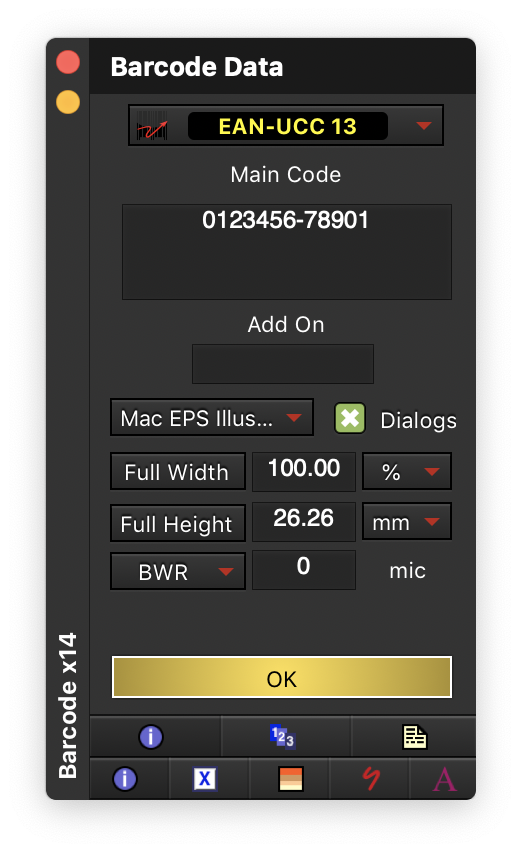
Simply type the code you require on the main window, shown below, press "OK".
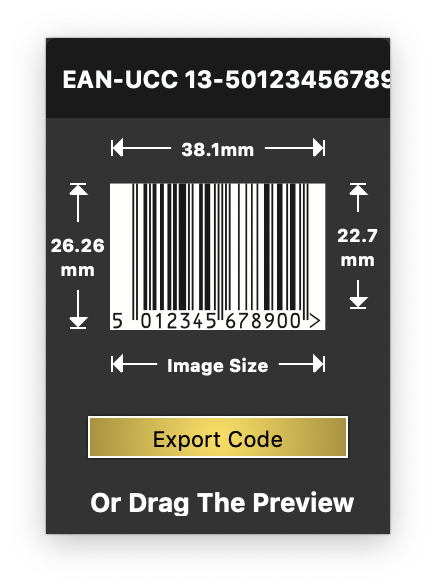
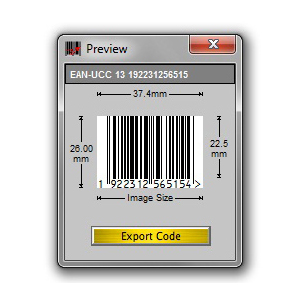
Then either click on the code that appears (shown below) or press the 'Export Code" button and your barcode is made.
No Prior Barcode Knowledge Required
All you need to know is what number you want to make into a barcode, it helps to know the code type, but this is not always essential as we can help you there.Simply e-mail us an example and we'll tell you what it is by return.
Fact: Some barcode software does not calculate check digits automatically for barcodes that require them, resulting in barcodes that do not scan.
Barcode X Automatic Check Digit Calculation
All Barcode types that require check digits, such as EAN 13 and ISBN 13 have the check digits automatically calculated and added to the barcode. This means you can never make a barcode with an incorrect check digit.
Automatic Check Digit Calculation
All Barcode types that require check digits, such as EAN 13 and ISBN 13 have the check digits automatically calculated and added to the barcode. This means you can never make a barcode with an incorrect check digit.
Full Size and Scale Controls
Barcode X can set sizes in %, inches, mm even SC values. It provides full control over height and bar width reduction in microns to allow for ink spread in all versions not as an additional add on, even Grip is supported for printing onto metal.
Scan Existing Barcodes To Create New Ones
With Barcode X you can use one of our barcode readers to scan a sample code and bring up the correct type and default settings in Barcode X.
Makes over 170 code types Supports all the industry standard code types, so never be stuck to make a code. It also supports all the other types you may wish for, categories include codes for Medical, Industrial, Retail, Publishing and many others.
Colour Scan Warning Barcode X has a unique scanability indicator when choosing a colour for your barcodes, to let you know whether it will scan when printed.
Full Colour Support Including Spot Colours Barcode supports colour libraries and spot colours, even custom spot colours.
Save Custom Code Types If you have modified the settings on a code type for a particular customer Barcode X can save these settings in a special menu for recall later.
Drop And Check Drag and drop a barcode eps made with Barcode X onto the application icon to either make a new one or check the settings such as BWR, ideal in a repro environment where mistakes can be very costly. Automatic GS1 128 Generation Barcode X is the only software on the market that automatically makes GS1 128 (EAN-UCC 128) barcodes without a special editor, simply enter the code as it would appear underneath the barcode and click OK, the application id's are automatically interpreted and the correct format output in the barcode.
Barcode Reading Hardware Available
Barcode X can be purchased as a bundle complete with our own Phoenix II CCD barcode reader so you really do have everything you need to make and check your barcodes scan.
Retailer specific code types
Many code types have specific features related to specific industry sectors and retailers. We are the only people who support Marks & Spencer code types and are recognised by Marks & Spencer as an approved supplier. We also support many other retailers specific code types, for example, Next, Debenhams and Ikea. If you have a code type we don't do, ask us, most likely we'll add it.
Thank you again for your very prompt service! We are very happy with the product. Tracey - Alexandria, NSW
Thank you very much for your hasty response and follow through. You guys have great service. Keep up the great work and we will definitely be contacting you again. Glen - The Basin, VIC
I received the OPN-2001 Pocket scanner last week and i just wanted to pass on how great it is. It's was a pleasure to receive something that functions far beyond my expectations. Thanks again, Joel
We have received the labels. Many thanks for the prompt service. Regards Maurice
Thank you for your call today and prompt service. It's greatly appreciated. Kindest regards, Crystelle
Hey Team... Many MANY kind thanks for your prompt help!! Can't thank you enough!! :)
Jo